> ## Documentation Index
> Fetch the complete documentation index at: https://docs.tokensmind.ai/llms.txt
> Use this file to discover all available pages before exploring further.
# Claude Code
> Use Claude Code with Tokensmind
## Quickstart
This guide gets Claude Code talking to Tokensmind in a few minutes.
### 1. Install Claude Code
#### Install script
```shellscript macOS theme={null} theme={null}
curl -fsSL https://claude.ai/install.sh | bash
```
```shellscript Windows theme={null} theme={null}
irm https://claude.ai/install.ps1 | iex
```
#### npm
Requires [Node.js 18+](https://nodejs.org/en/download/)
```shellscript theme={null} theme={null}
npm install -g @anthropic-ai/claude-code
```
### 2. Point Claude Code at Tokensmind
For Anthropic-compatible access via Tokensmind, set:
1. `ANTHROPIC_BASE_URL` → `https://tokensmind.ai`
2. `ANTHROPIC_AUTH_TOKEN` → API key from [Tokensmind](https://tokensmind.ai/token)
3. `ANTHROPIC_MODEL` → a model id from the [model list](https://tokensmind.ai/pricing)
1) Check your default shell:
```shellscript theme={null} theme={null}
echo $SHELL
```
2. Append exports (replace `TOKENSMIND_API_KEY`):
```shellscript Zsh theme={null} theme={null}
echo 'export ANTHROPIC_BASE_URL="https://tokensmind.ai"' >> ~/.zshrc
echo 'export ANTHROPIC_AUTH_TOKEN="TOKENSMIND_API_KEY"' >> ~/.zshrc
echo 'export ANTHROPIC_MODEL="claude-sonnet-4-5"' >> ~/.zshrc
```
```shellscript Bash theme={null} theme={null}
echo 'export ANTHROPIC_BASE_URL="https://tokensmind.ai"' >> ~/.bash_profile
echo 'export ANTHROPIC_AUTH_TOKEN="TOKENSMIND_API_KEY"' >> ~/.bash_profile
echo 'export ANTHROPIC_MODEL="claude-sonnet-4-5"' >> ~/.bash_profile
```
3. Reload:
```shellscript Zsh theme={null} theme={null}
source ~/.zshrc
```
```shellscript Bash theme={null} theme={null}
source ~/.bash_profile
```
4. Verify in a new terminal:
```shellscript theme={null} theme={null}
echo $ANTHROPIC_BASE_URL
echo $ANTHROPIC_AUTH_TOKEN
echo $ANTHROPIC_MODEL
```
In CMD or PowerShell, set Tokensmind base URL and [API key](https://tokensmind.ai/token) as user env vars.
1. Run:
```shellscript theme={null} theme={null}
REM Replace TOKENSMIND_API_KEY
setx ANTHROPIC_AUTH_TOKEN "TOKENSMIND_API_KEY"
setx ANTHROPIC_BASE_URL "https://tokensmind.ai"
setx ANTHROPIC_MODEL "claude-sonnet-4-5"
```
2. New CMD window:
```shellscript theme={null} theme={null}
echo %ANTHROPIC_AUTH_TOKEN%
echo %ANTHROPIC_BASE_URL%
echo %ANTHROPIC_MODEL%
```
1. Run:
```shellscript theme={null} theme={null}
# Replace TOKENSMIND_API_KEY
[Environment]::SetEnvironmentVariable("ANTHROPIC_AUTH_TOKEN", "TOKENSMIND_API_KEY", [EnvironmentVariableTarget]::User)
[Environment]::SetEnvironmentVariable("ANTHROPIC_BASE_URL", "https://tokensmind.ai", [EnvironmentVariableTarget]::User)
[Environment]::SetEnvironmentVariable("ANTHROPIC_MODEL", "claude-sonnet-4-5", [EnvironmentVariableTarget]::User)
```
2. New PowerShell window:
```shellscript theme={null} theme={null}
echo $env:ANTHROPIC_AUTH_TOKEN
echo $env:ANTHROPIC_BASE_URL
echo $env:ANTHROPIC_MODEL
```
### 3. Run
From your project:
```bash theme={null} theme={null}
$ cd /path/your-project
> claude
```
First launch may ask you to sign in to Anthropic. To skip:
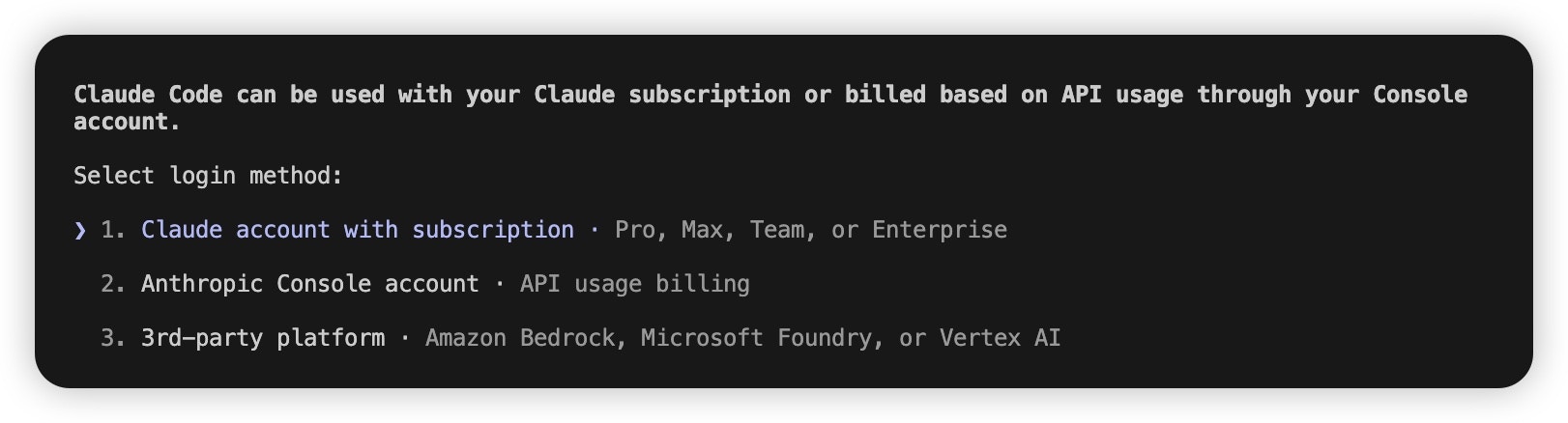 1. Edit `~/.claude.json` (macOS/Linux) or `C:\Users\%USERNAME%\.claude.json` (Windows).
2. Set `hasCompletedOnboarding` to `true`:
```json theme={null} theme={null}
{
"hasCompletedOnboarding": true
}
```
3. Save and run `claude` again.
#### More ways to pick models (priority high → low)
1. **In session**: `/model ` for a one-off switch.
```text theme={null} theme={null}
/model claude-sonnet-4-5
```
2. **CLI flag**: `claude --model ` for one run.
```text theme={null} theme={null}
claude --model claude-sonnet-4-5
```
3. **Env defaults** (global):
```shellscript theme={null} theme={null}
export ANTHROPIC_DEFAULT_OPUS_MODEL="claude-opus-4-5"
export ANTHROPIC_DEFAULT_SONNET_MODEL="claude-sonnet-4-5"
export ANTHROPIC_DEFAULT_HAIKU_MODEL="claude-haiku-4-5"
```
* **OPUS** — hard reasoning / architecture
* **SONNET** — everyday coding
* **HAIKU** — quick checks, search
4. **`settings.json`** (project or user home):
```json theme={null} theme={null}
{
"env": {
"ANTHROPIC_DEFAULT_OPUS_MODEL": "claude-opus-4-5",
"ANTHROPIC_DEFAULT_SONNET_MODEL": "claude-sonnet-4-5",
"ANTHROPIC_DEFAULT_HAIKU_MODEL": "claude-haiku-4-5"
}
}
```
## CC-Switch
1. Open CC-Switch → **Add provider**.
1. Edit `~/.claude.json` (macOS/Linux) or `C:\Users\%USERNAME%\.claude.json` (Windows).
2. Set `hasCompletedOnboarding` to `true`:
```json theme={null} theme={null}
{
"hasCompletedOnboarding": true
}
```
3. Save and run `claude` again.
#### More ways to pick models (priority high → low)
1. **In session**: `/model ` for a one-off switch.
```text theme={null} theme={null}
/model claude-sonnet-4-5
```
2. **CLI flag**: `claude --model ` for one run.
```text theme={null} theme={null}
claude --model claude-sonnet-4-5
```
3. **Env defaults** (global):
```shellscript theme={null} theme={null}
export ANTHROPIC_DEFAULT_OPUS_MODEL="claude-opus-4-5"
export ANTHROPIC_DEFAULT_SONNET_MODEL="claude-sonnet-4-5"
export ANTHROPIC_DEFAULT_HAIKU_MODEL="claude-haiku-4-5"
```
* **OPUS** — hard reasoning / architecture
* **SONNET** — everyday coding
* **HAIKU** — quick checks, search
4. **`settings.json`** (project or user home):
```json theme={null} theme={null}
{
"env": {
"ANTHROPIC_DEFAULT_OPUS_MODEL": "claude-opus-4-5",
"ANTHROPIC_DEFAULT_SONNET_MODEL": "claude-sonnet-4-5",
"ANTHROPIC_DEFAULT_HAIKU_MODEL": "claude-haiku-4-5"
}
}
```
## CC-Switch
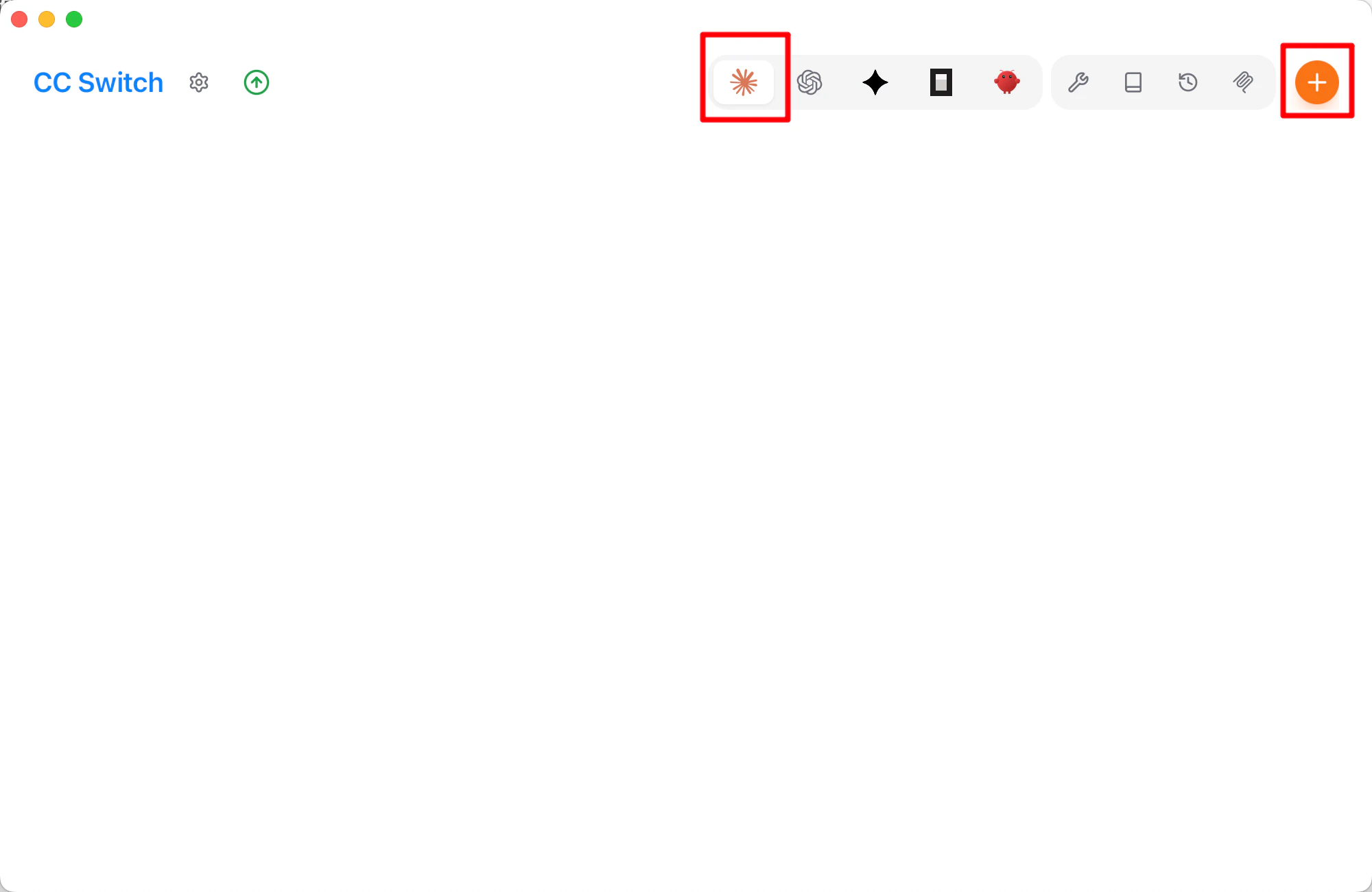
1. Open CC-Switch → **Add provider**.
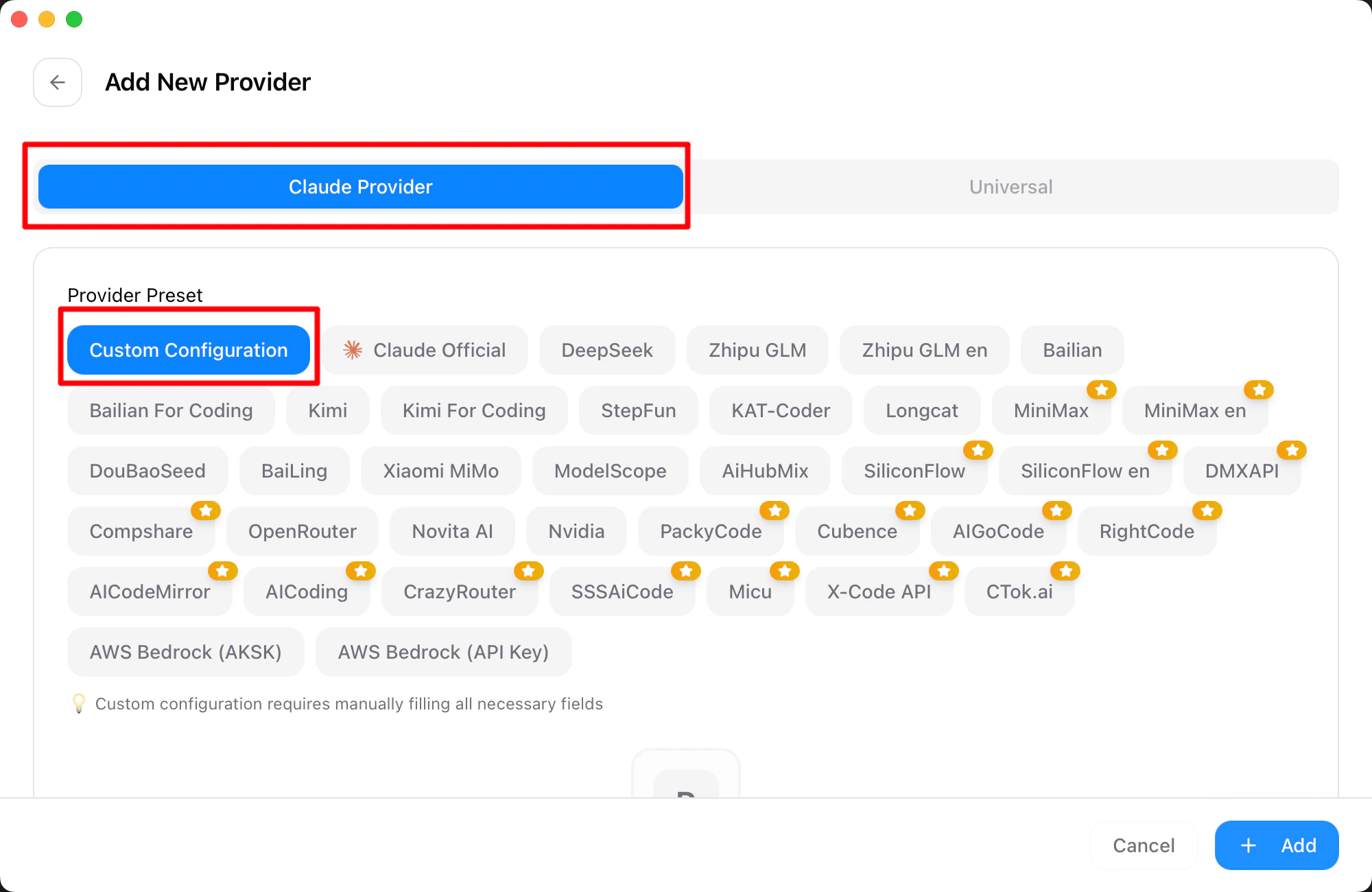
 2. Choose **Custom**.
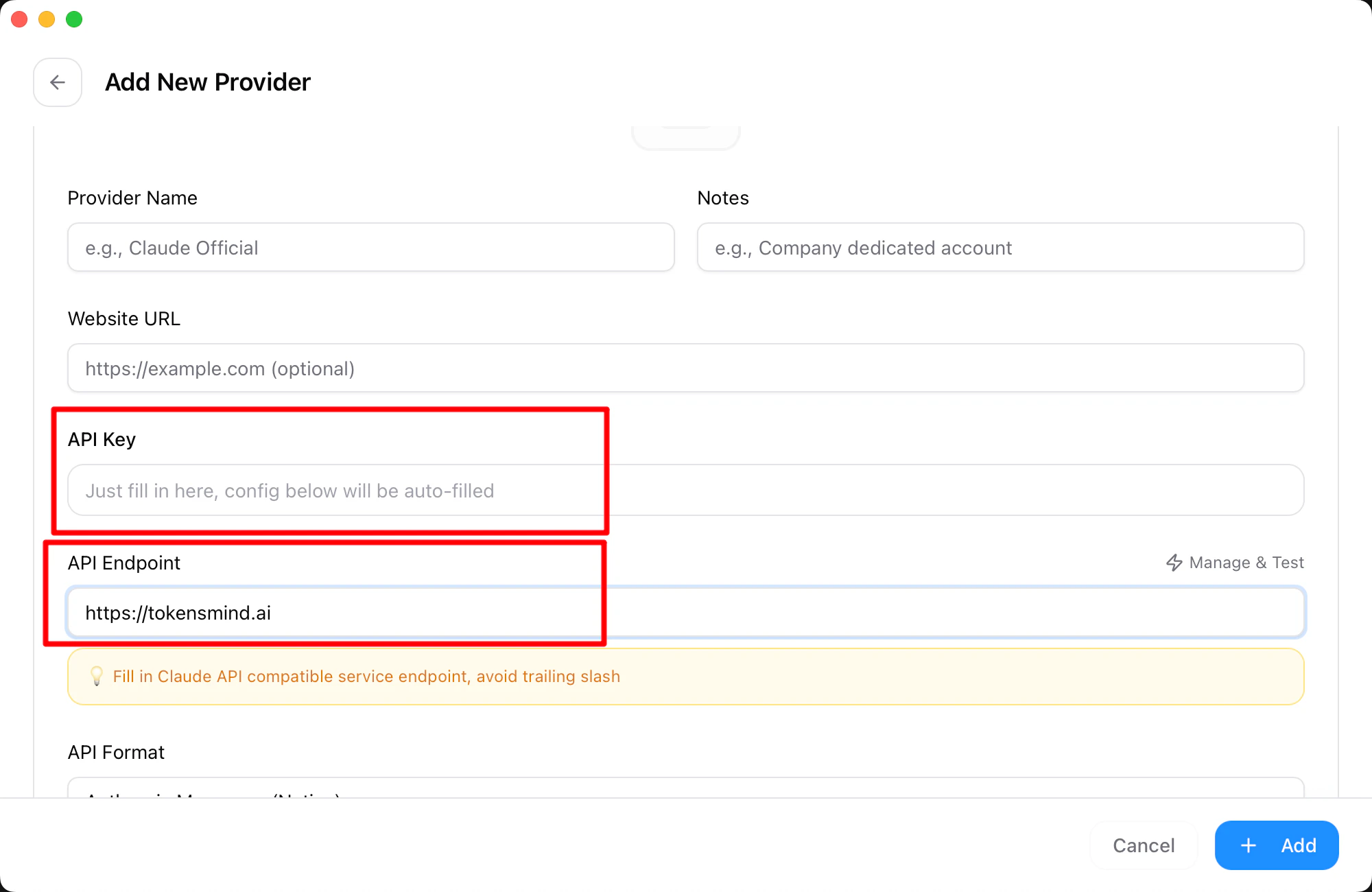
 3. Enter API key and endpoint.
 4. **Add** to save.
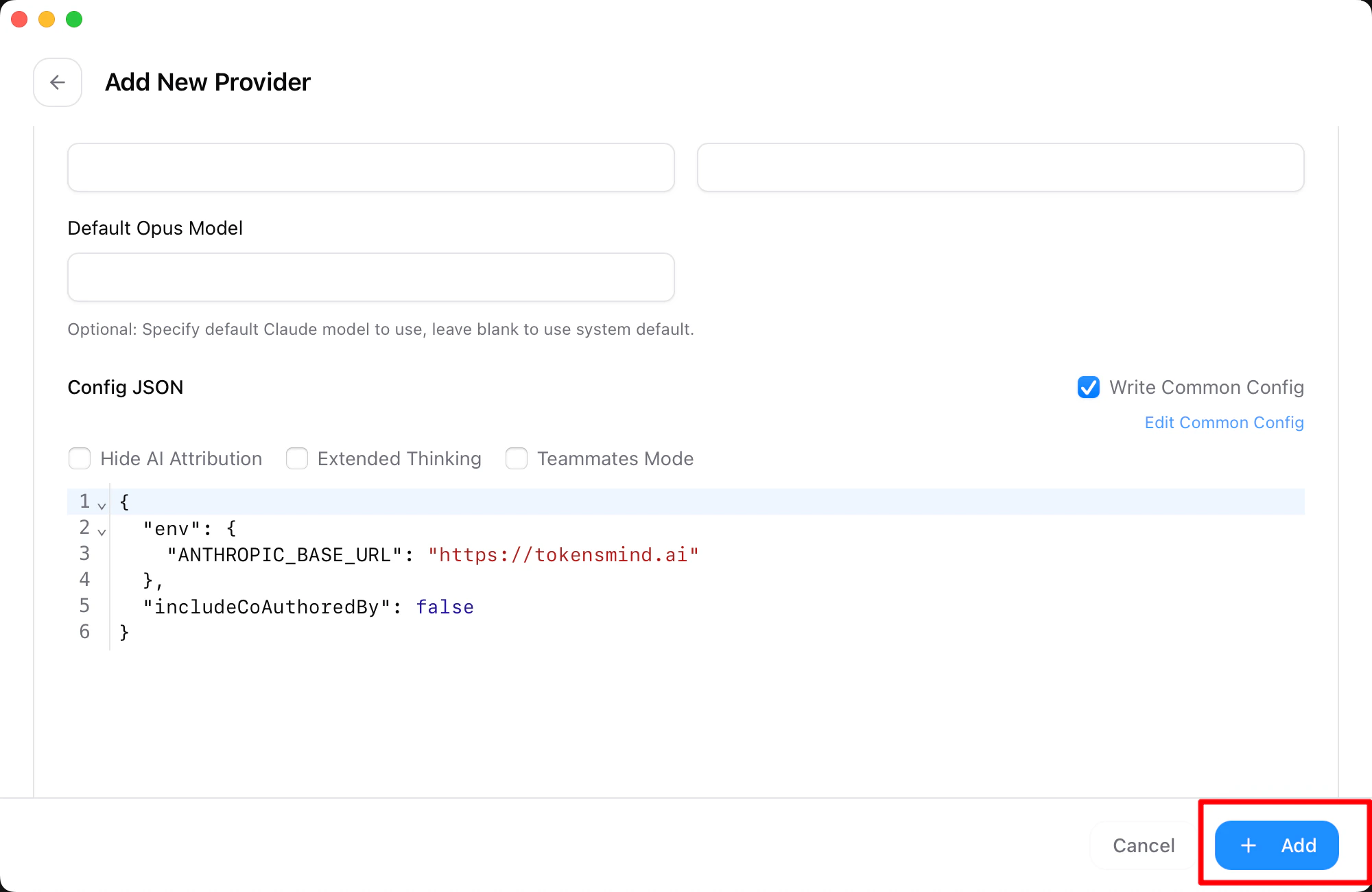 5. Home → select **tokensmind** → **Start**.
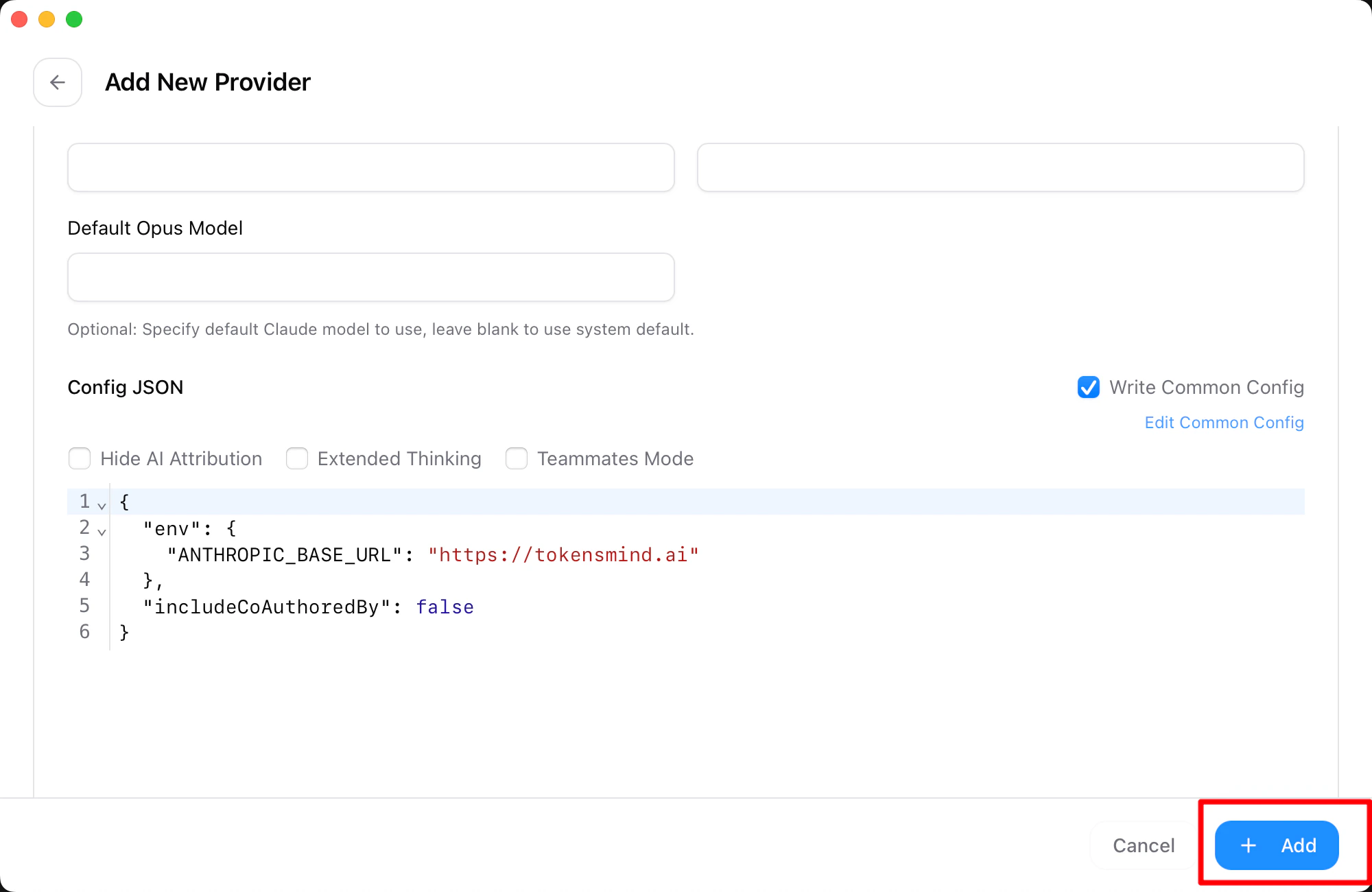 ## VS Code extension
1. Install the extension.
## VS Code extension
1. Install the extension.
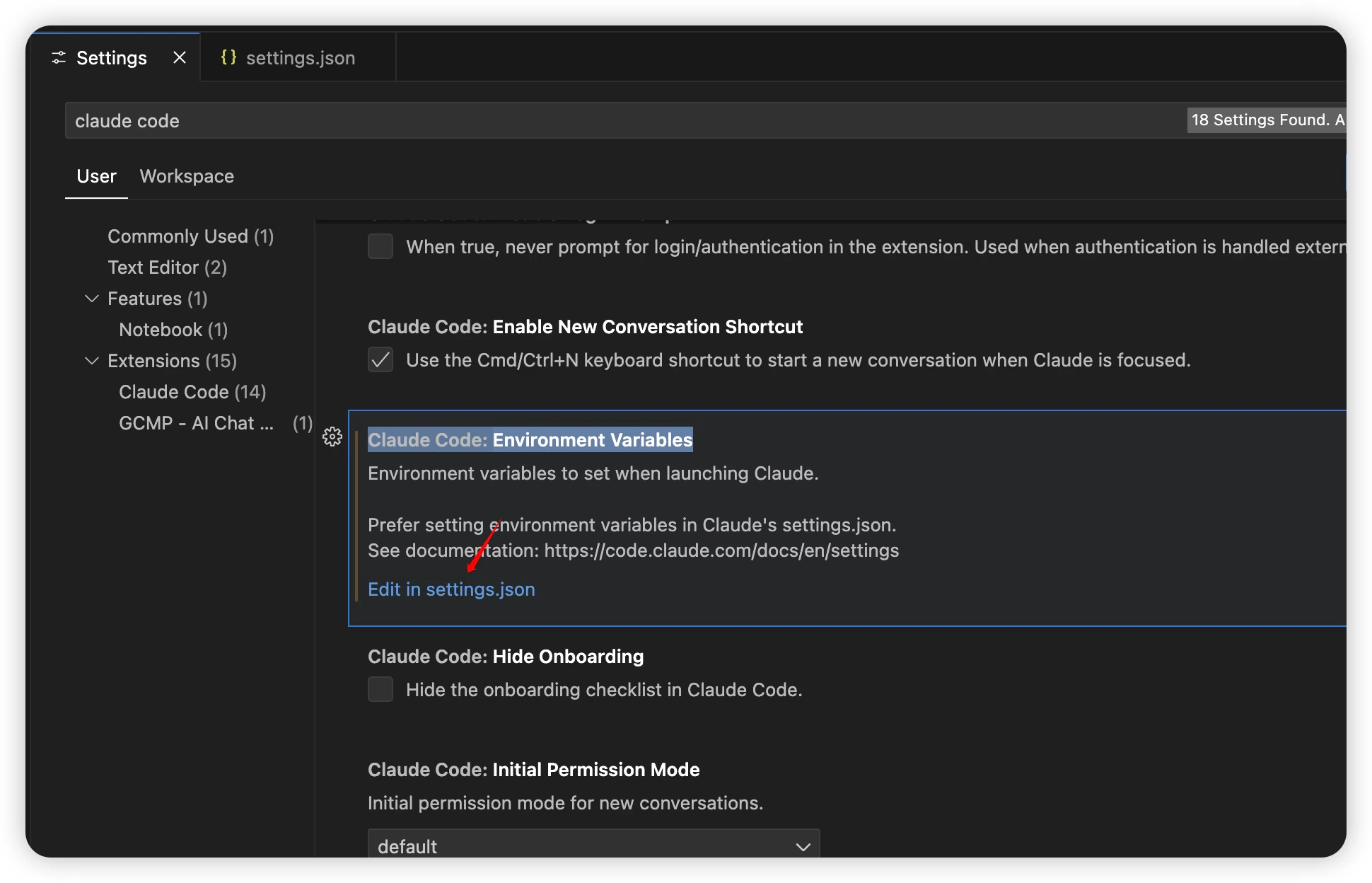
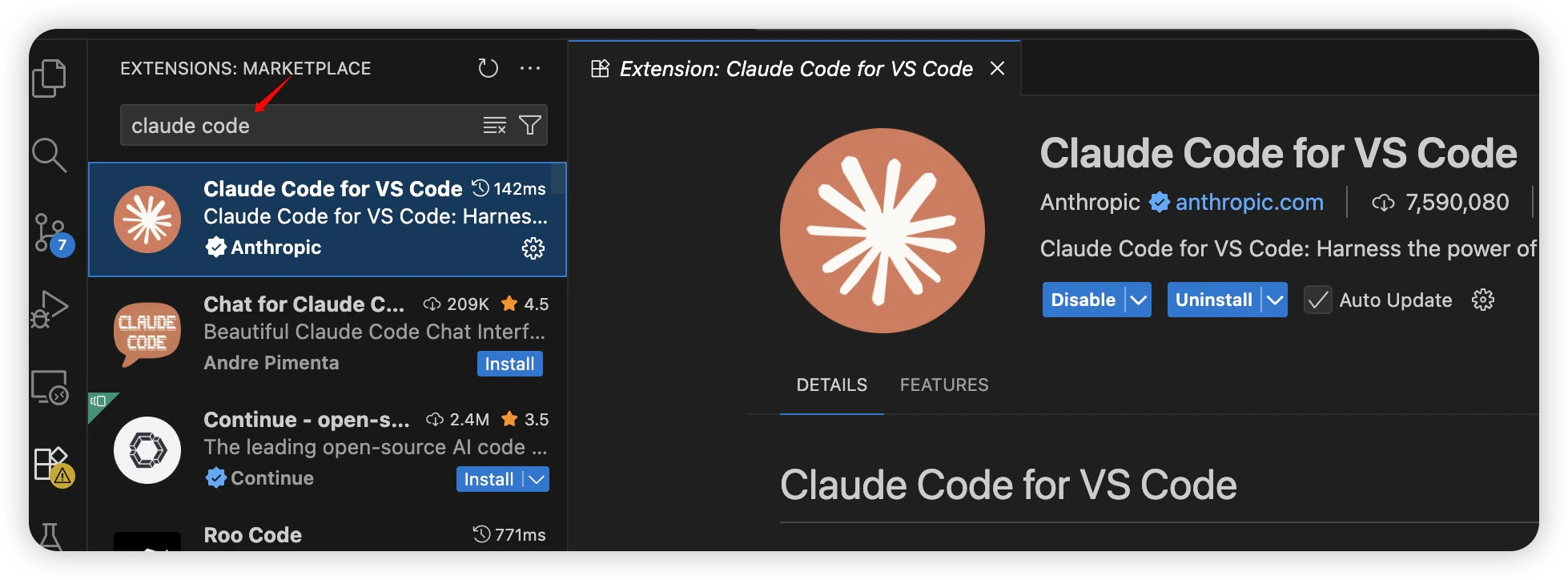 2. `Ctrl + Shift + P` / `Cmd + Shift + P` → **Settings**.
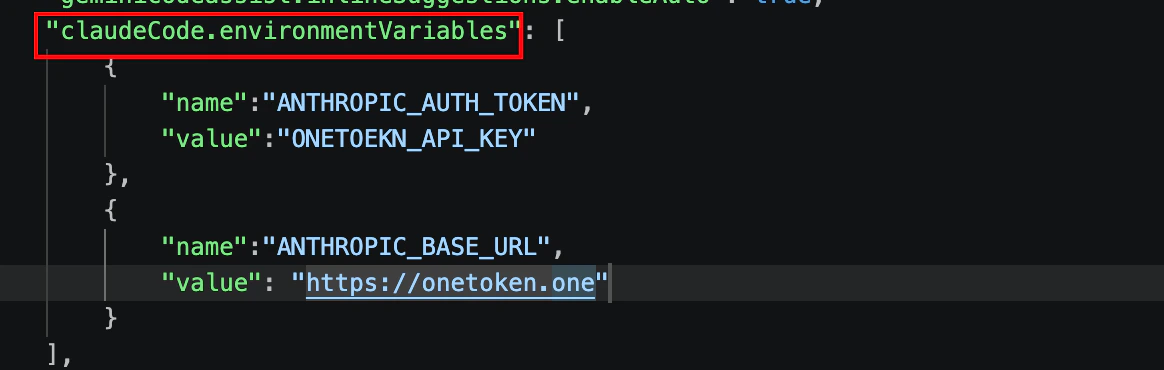
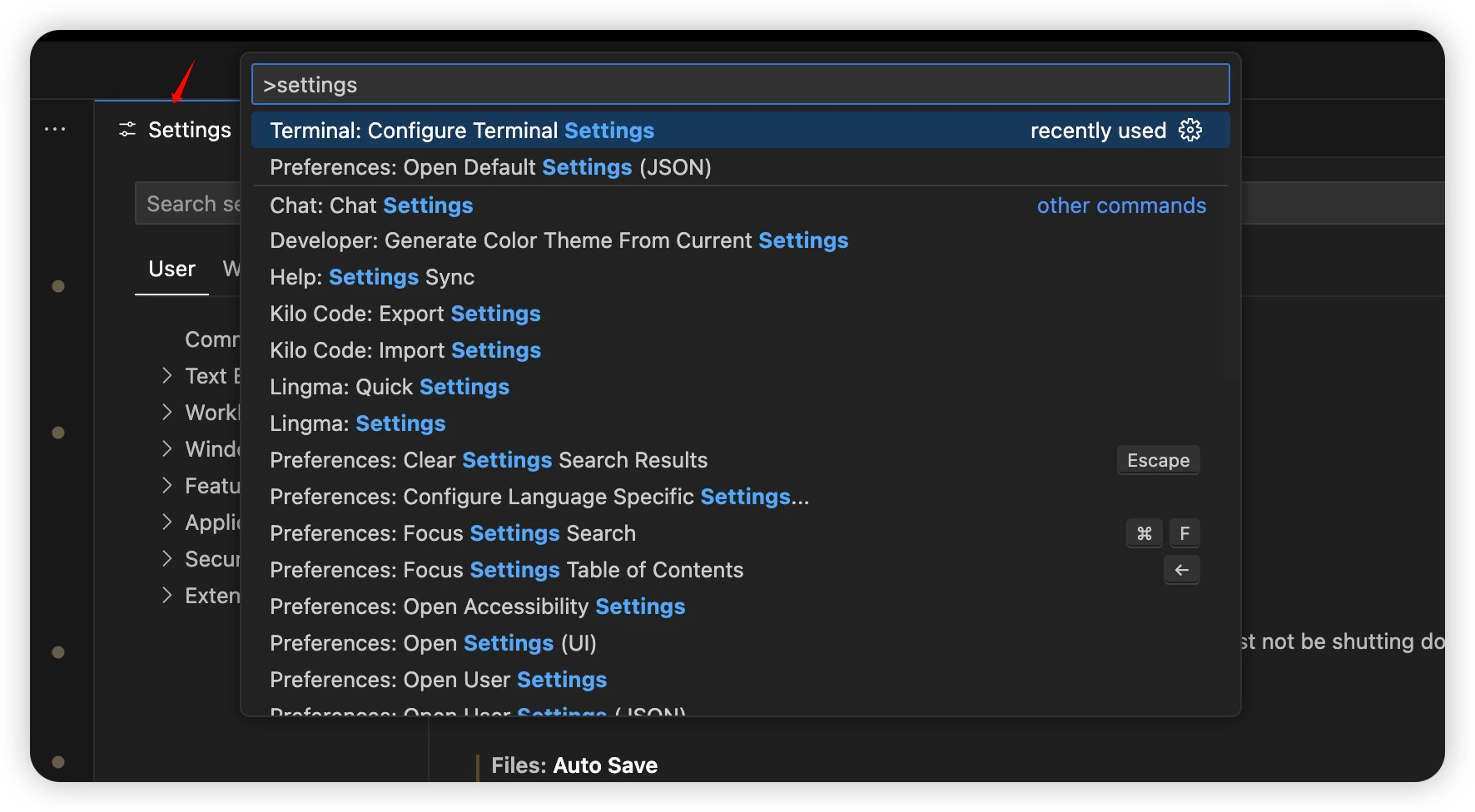 3. Search **Claude Code** → `Claude Code: Environment Variable` → **Edit in settings.json**.
 4. Fill `claudeCode.environmentVariables` with Tokensmind values.
 ## FAQ
### Q: `401 , No token provided...`
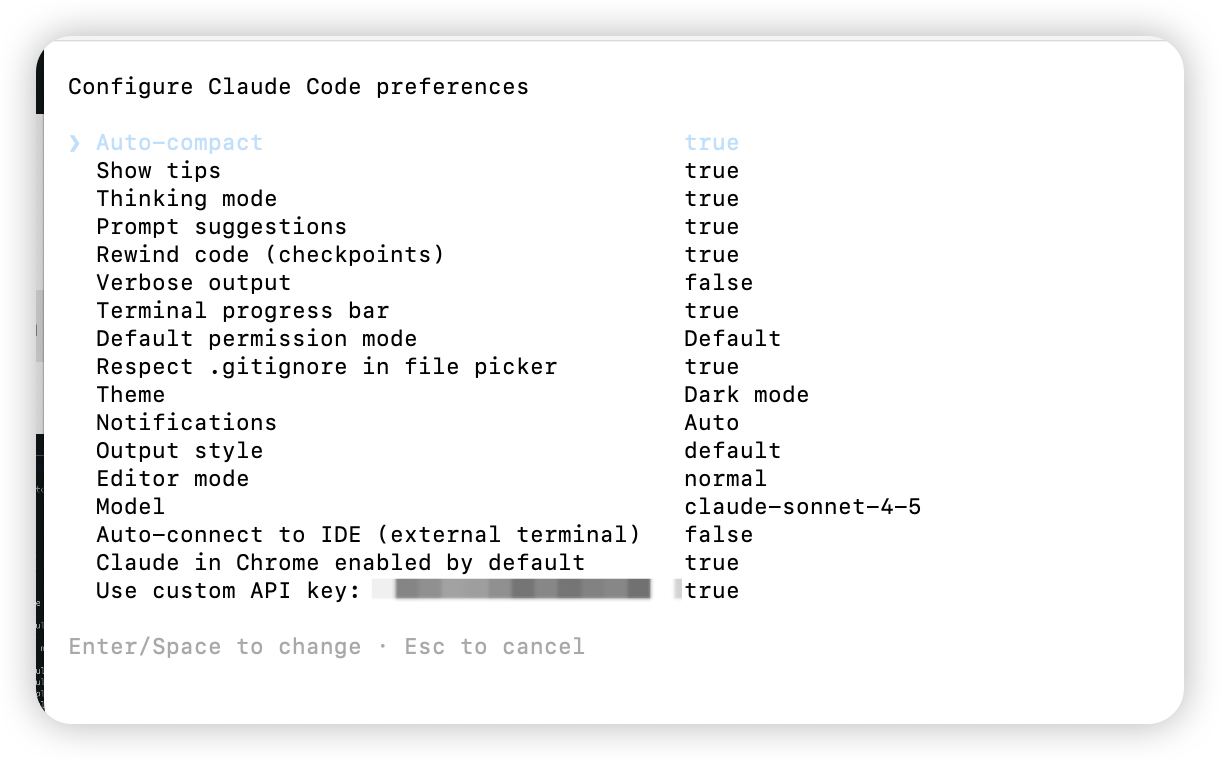
In the Claude terminal run `/config`, enable **Use custom API key**, verify the token.
## FAQ
### Q: `401 , No token provided...`
In the Claude terminal run `/config`, enable **Use custom API key**, verify the token.
 ### Q: `zsh: command not found: claude` on macOS
The binary exists but isn’t on `PATH`. Common locations:
* `~/.claude/bin`
* `~/.local/bin`
```shellscript theme={null} theme={null}
ls -l ~/.claude/bin
# or
ls -l ~/.local/bin | grep claude
```
**If in `~/.claude/bin`:**
```shellscript theme={null} theme={null}
echo 'export PATH="$HOME/.claude/bin:$PATH"' >> ~/.zshrc
source ~/.zshrc
```
**If in `~/.local/bin`:**
```shellscript theme={null} theme={null}
echo 'export PATH="$HOME/.local/bin:$PATH"' >> ~/.zshrc
source ~/.zshrc
```
Check:
```text theme={null} theme={null}
which claude
claude -v
```
### Q: Cannot reach Anthropic
Newer Claude Code builds expect **`ANTHROPIC_AUTH_TOKEN`** instead of `ANTHROPIC_API_KEY`. Update the header name and reload env—key value stays the same. Follow the env steps above.
### Q: Login API Error 403
### Q: `zsh: command not found: claude` on macOS
The binary exists but isn’t on `PATH`. Common locations:
* `~/.claude/bin`
* `~/.local/bin`
```shellscript theme={null} theme={null}
ls -l ~/.claude/bin
# or
ls -l ~/.local/bin | grep claude
```
**If in `~/.claude/bin`:**
```shellscript theme={null} theme={null}
echo 'export PATH="$HOME/.claude/bin:$PATH"' >> ~/.zshrc
source ~/.zshrc
```
**If in `~/.local/bin`:**
```shellscript theme={null} theme={null}
echo 'export PATH="$HOME/.local/bin:$PATH"' >> ~/.zshrc
source ~/.zshrc
```
Check:
```text theme={null} theme={null}
which claude
claude -v
```
### Q: Cannot reach Anthropic
Newer Claude Code builds expect **`ANTHROPIC_AUTH_TOKEN`** instead of `ANTHROPIC_API_KEY`. Update the header name and reload env—key value stays the same. Follow the env steps above.
### Q: Login API Error 403
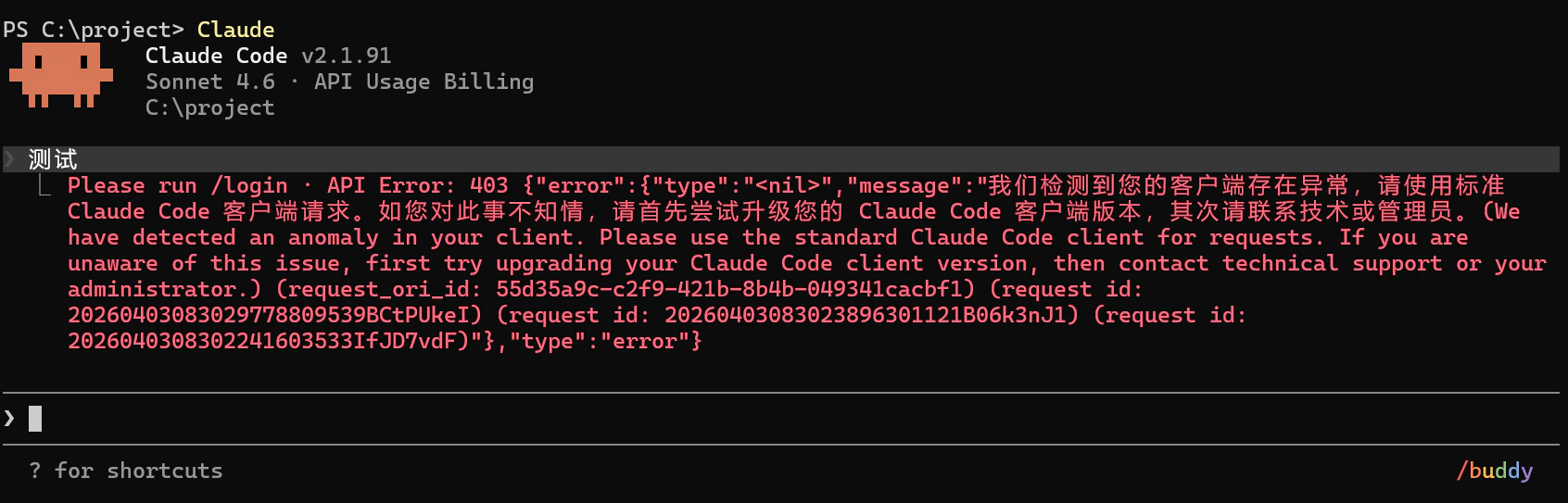 Upgrade Claude Code to the latest version and disable CC-Switch local proxy / failover if enabled.
Happy coding!
Upgrade Claude Code to the latest version and disable CC-Switch local proxy / failover if enabled.
Happy coding!